Choosing between Elementor v4 and Bricks 2.2 is about more than comparing widgets. It is about the way you want to build WordPress websites, the systems you want to maintain, and the friction you are prepared to deal with.
Elementor is making a significant move towards structured, system-based building. Bricks is refining a workflow built around those principles from the beginning.
That distinction affects everything from styling and third-party add-ons to pricing, editor consistency, and the learning curve. No hype or fanboy nonsense. Just the trade-offs that matter for your next project.
Key Takeaways
- Elementor v4 is modernizing its architecture, while Bricks 2.2 refines an established CSS-first workflow.
- Bricks currently offers more mature global styling, stronger framework support, and no in-editor upsells.
- Elementor’s atomic transition means third-party support and interface consistency need time to mature.
- Choose based on your workflow, ecosystem needs, and tolerance for transition rather than feature counts.
Table of Contents
- The Bigger Picture: Elementor Is Transitioning, Bricks Is Maturing
- Pricing Clarity and In-Editor Upsells
- Global Classes and Variables: Availability vs Maturity
- CSS Framework Support
- Elementor’s Atomic System and the Add-On Transition
- Interface Consistency and the Changing Learning Curve
- Editor Performance: Neither Builder Is Immune to Complexity
- Which Builder Should You Choose for Your Next Project?
The Bigger Picture: Elementor Is Transitioning, Bricks Is Maturing
Elementor v4 is not a minor update. It represents a substantial change to the builder’s foundations, with atomic elements, class-based styling, global variables, and a stronger focus on proper design systems.
That is a positive direction. Rather than treating every page as a separate collection of styling decisions, Elementor is encouraging a more reusable, structured approach.
Bricks 2.2 is in a different position. It is not rebuilding its identity around those ideas because CSS-first principles and structured workflows are already central to how it works. Its development is more about refinement than reinvention.
Elementor is moving towards a system-driven workflow. Bricks is improving one it already has. Neither situation automatically makes a builder right or wrong for a project, but architectural transitions are often where friction appears.
Pricing Clarity and In-Editor Upsells
How straightforward is the licence decision?
Bricks has one of the clearer pricing structures in the WordPress builder space. The key advantage is that you are not choosing feature tiers based on which widgets or core tools you need.
There are licence choices, but that is different from trying to work out whether a particular feature is included in the plan you are about to buy.
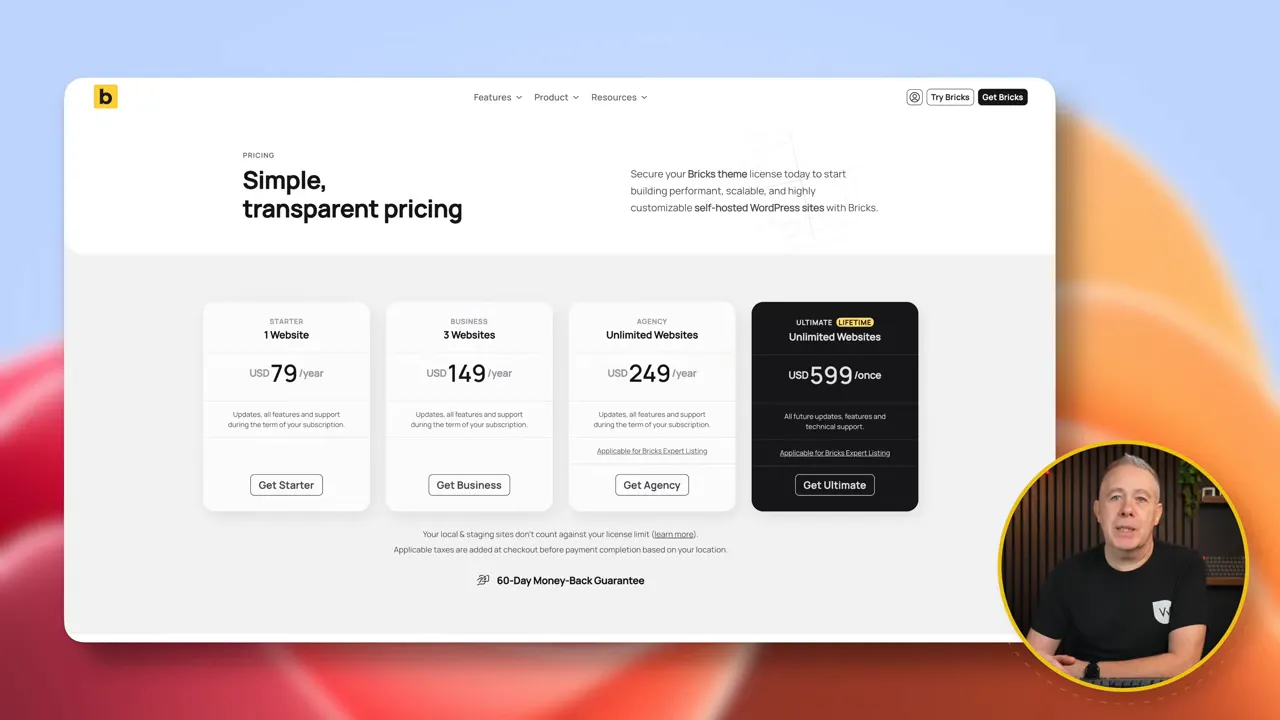
Elementor’s paid plans are more layered. Different subscriptions unlock different capabilities, so the purchasing decision depends more heavily on the features your project requires.
That does not make the model bad. But clarity matters when you are quoting a client or planning several projects. A licence structure that is easy to understand is also easier to explain and budget for.
The editor is also your workspace
Elementor includes upgrade prompts inside the editor. These can include reminders about locked features and suggestions to install additional plugins or use related services.
Some people barely notice them. Others find them distracting or downright annoying. If you spend hours in the editor every day, those interruptions become part of your working environment.
Bricks does not have those in-editor upsells. You open the builder and get on with the build.
It is a small difference on a feature checklist, but a quieter workspace can matter more than another widget when it is where you spend most of your day.
Global Classes and Variables: Availability vs Maturity
Elementor v4’s introduction of classes and variables is a substantial improvement. It encourages the kind of design-system thinking that helps prevent page-by-page styling chaos.
The principle is straightforward: define a shared class, reuse it wherever it belongs, and update that class when the shared styling needs to change. You are maintaining a system rather than revisiting individual elements across a site.
Variables support the same approach by giving you reusable values for your design decisions. If the concept is new to you, the MDN guide to CSS custom properties provides useful background on the underlying CSS.
Bricks has operated this way for a long time, and that experience shows. Global classes feel foundational, variables are deeply integrated, and the CSS cascade behaves predictably.
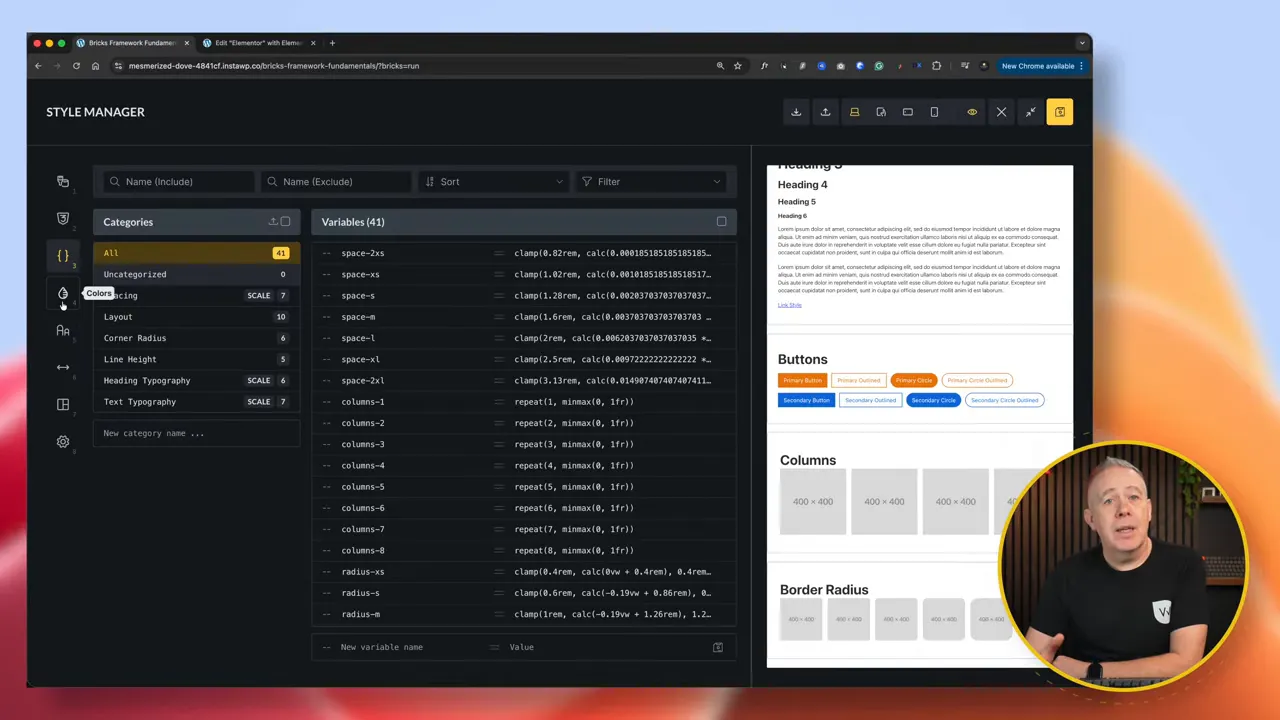
This becomes particularly relevant if your workflow depends on:
- Consistent spacing scales.
- Reusable typography systems.
- Shared utility-style patterns.
- Global styling changes across multiple pages.
The distinction is not simply whether both builders offer classes and variables. It is how comfortably those tools fit together during a real build.
Elementor v4 is making important progress. Bricks offers the more mature class-and-variable workflow today.
CSS Framework Support
If you already use a structured CSS methodology or a utility-based framework, Bricks is generally the more comfortable environment.
It offers stronger overall support for managing frameworks as part of your workflow, backed by an established third-party ecosystem for that approach to building.
That can make a meaningful difference to development speed. A framework is most useful when the builder lets you work naturally with its classes and conventions, rather than making you work around the interface.
Elementor v4 is moving towards being more framework-friendly, but it is still adapting. If structured CSS systems are central to the way you build sites, Bricks currently has the advantage.
Elementor’s Atomic System and the Add-On Transition
Elementor’s atomic elements are part of a longer-term architectural direction: cleaner markup, more consistent behavior, and better structure.
Those are worthwhile goals. The short-term consideration is how quickly the surrounding ecosystem can adapt.
Third-party developers need time to support the new architecture. If your Elementor workflow relies heavily on add-ons, you cannot assume that the size of the existing ecosystem means every atomic feature will have equally mature support immediately.
A large ecosystem and mature support for a new architecture are not the same thing.
This does not mean your existing add-ons suddenly stop working. It means that support for the new atomic approach may develop at different speeds, potentially creating limitations during the transition.
Bricks is not going through the same foundational adjustment. Its ecosystem continues to evolve, but developers are not responding to the same kind of architectural reset.
For your next project, the relevant question is not just which add-ons exist. It is whether the particular tools you depend on support the workflow you intend to use.
Interface Consistency and the Changing Learning Curve
Elementor’s familiarity vs Bricks’ predictability
Elementor has traditionally tried to balance beginner accessibility with advanced capabilities. Version 4 changes parts of that experience, particularly while legacy widgets and atomic elements coexist.
That mixture can create moments of inconsistency. A setting may be somewhere different, or one type of element may behave differently from another. Individually, these moments may be minor. Repeated throughout a build, they can interrupt your flow.
Bricks is more utilitarian. It is structured, predictable, and less flashy.
Some people find that less welcoming at first. Others appreciate having a consistent interface that gets out of the way. The better fit depends partly on whether you value immediate familiarity or a more uniform development workflow.
Is Elementor still dramatically easier?
Historically, the argument was simple: Elementor was the accessible drag-and-drop option. Add something, move it, style it, and carry on.
But v4 increasingly encourages classes, variables, reusable styling logic, and system-based thinking. That is good for building maintainable websites, but it also means the workflow asks more of you than isolated visual styling.
Bricks expects structural thinking from the start. As Elementor moves in the same direction, the learning-curve gap becomes less dramatic.
Familiarity is not the same as simplicity. Elementor may feel easier because you already know where things are, not because its modern workflow is fundamentally simpler.
If you are going to learn system-based building anyway, it is worth comparing the tools on that basis rather than relying on their older reputations.
Editor Performance: Neither Builder Is Immune to Complexity
Elementor’s editor has improved over time, but it can still be resource-heavy. On lower-powered hosting, server configuration and memory limits can become important.
For someone less comfortable with technical troubleshooting, having to investigate hosting resources or adjust server settings can be frustrating. The builder is only one part of that experience, but it is where the friction becomes visible.
Bricks generally feels lighter in the editor. However, it is not immune to slowdowns.
Complex pages, large query loops, and heavy dynamic structures can also make the Bricks editor less responsive. Choosing Bricks does not remove the performance cost of a demanding build.
My practical distinction is consistency: Elementor can begin to feel heavy earlier, while Bricks usually remains comfortable for longer before similar friction appears.
This is about editor responsiveness, not a claim that every Bricks website will load faster than every Elementor website. Those are separate comparisons.
Which Builder Should You Choose for Your Next Project?
Choose Elementor v4 if these priorities sound like yours
- You want a familiar visual builder experience.
- You value Elementor’s extensive ecosystem.
- You want to stay with a platform investing heavily in modern design systems.
- You are comfortable working through an architectural transition.
There are good reasons to stay with Elementor, particularly when it already fits your workflow. Version 4’s move towards structure is meaningful. The trade-off is accepting that the interface, add-on support, and newer workflows need time to settle.
Choose Bricks 2.2 if these priorities matter more
- You want mature global classes and variables now.
- You build around CSS frameworks or structured styling methodologies.
- You prefer clearer feature access across licence options.
- You want an editor without upgrade prompts.
- You want less reliance on third-party plugins for core functionality.
- You prefer an approach closer to visual development than traditional page building.
For that combination of priorities, Bricks is the stronger fit. Its appeal is not that it avoids every complication. It is that structured building is already central to the platform rather than a new direction being introduced.
The most useful question is not which builder wins in the abstract. It is this: do you want to build inside a platform evolving towards a structured workflow, or one already built around it?
Answer that honestly, alongside your ecosystem needs and tolerance for transition, and the decision becomes much clearer.


